
Every Zoolz account is required to have at least one super administrator user. This user possesses greater managerial privileges compared to standard users within the account.
The person who creates the Zoolz account is the super administrator of that account.
The super administrator of a Zoolz account holds the authority to elevate standard users to administrator status and regulate their administrative permissions accordingly.
How to Promote a Standard User to Administrator
- Sign in to your Zoolz web console as a super admin user.
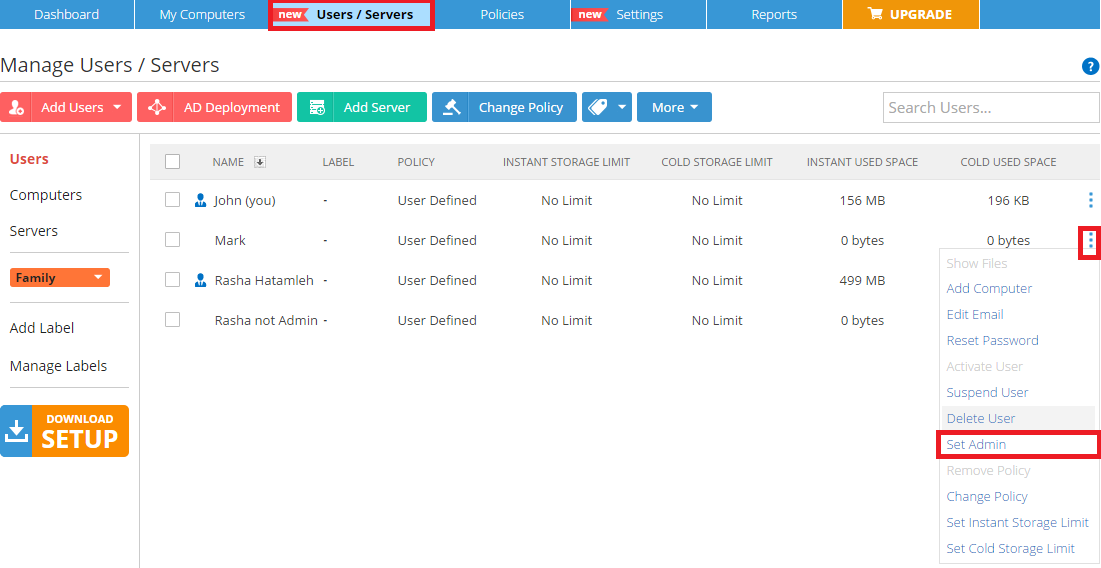
- Refer to the Users/Servers tab.
- Click on the Action button for the user you want to give them admin privileges → Select the Set as Admin option.
- From the confirmation box that will appear, you can edit the privileges given to this new admin by clicking the Edit Admin Privileges link.
Proceeding without modifying the admin privileges will designate the user as a super administrator with unrestricted access.
How to Demote an Administrator User to Standard
- Sign in to your Zoolz web console as a super admin user.
- Refer to the Users / Servers page.
- Select the All Users option from the left-side panel.
- Click the Action icon (
 ) for the administrator user that you want to demote → Manage Users → Remove Admin.
 - Click OK to confirm.
Best Practices to Avoid Admin Lockouts
To keep your Zoolz account safe and manageable:
- Assign administrative privileges to a small group of trusted individuals.
- Review role assignments when users move or leave.
- Avoid relying on only one person to hold this permission.